Kemal's Braindump

emacs

#emacs #brainiac #productivity #systems

Time has come to release a new version of Brainiac. The whole configuration file has been almost completly restructured, cleaned up and properly commented. So I will declare this to be version 2.0.

Read more...

#brainiac #emacs #productivity #system

Brainiac started as a way for me to organize my own work: meeting notes with my team, technical reflections, TODOs, and the many small but important thoughts that accumulate over the course of real engineering work. Over time, it became a stable personal system that supports both focused technical work and leadership responsibilities, without getting in the way.

I host stable versions of Brainiac on Codeberg.

In it's core this is a minimal Emacs configuration, built around the great Org-mode, with additional external tools mixed in to build a complete, sustainable, flexible productivity system. As it's built around text files, it can be synced across multiple devices with ease using e.g. Syncthing, Nextcloud, git, etc. It is complimented nicely with mobile apps like Beorg, Orgzly, etc.

Brainiac is not meant to be a polished product. It’s a living system, shaped by everyday use — the kind of system you build when you care about clarity, continuity, and reducing friction in knowledge work. If you use it, feel free to reach out with feedback, ideas, or improvements. Shared practice tends to evolve better than isolated solutions.

#emacs #brainiac #productivity #systems

Hello everyone!

I have been using the Brainiac intensively over the last months and made some changes to the configuration along the way. Get your update here or from Codeberg.

Improvements:

  • Added journal.org to the list of refile targets.
  • Reduced the width of comment, source, etc. boxes in brainiac.css.
  • The attached items are now visibly listed in the drawer of the headline.
  • Minor changes in the configuration, e.g. increase of idle time etc.

New things:

  • Added org-crypt to the config, so that sensitive information can be encrypted if storing files on public servers.
  • To integrate Brainiac into your system menu, I propose the following: copy brainiac.desktop to ~/.local/share/applications and brainiac.svg to ~/.local/share/icons.
  • I added basic AI support by using a customized ollama-buddy-mini and running models locally with ollama. Although I previously stated that Brainiac would not have AI, the chosen combination presents a nice compromise between functionality and privacy.
  • I also introduced the abbrev-mode as a template storage for some useful org templates and as a mechanism for storing AI prompts for future usage.
  • In order to consolidate important functions and keystrokes, I configured a menu which can be reached by pressing C-c b using transient.

Brainiac v1.1 released

#emacs #orgmode #brainiac #gtd #productivity

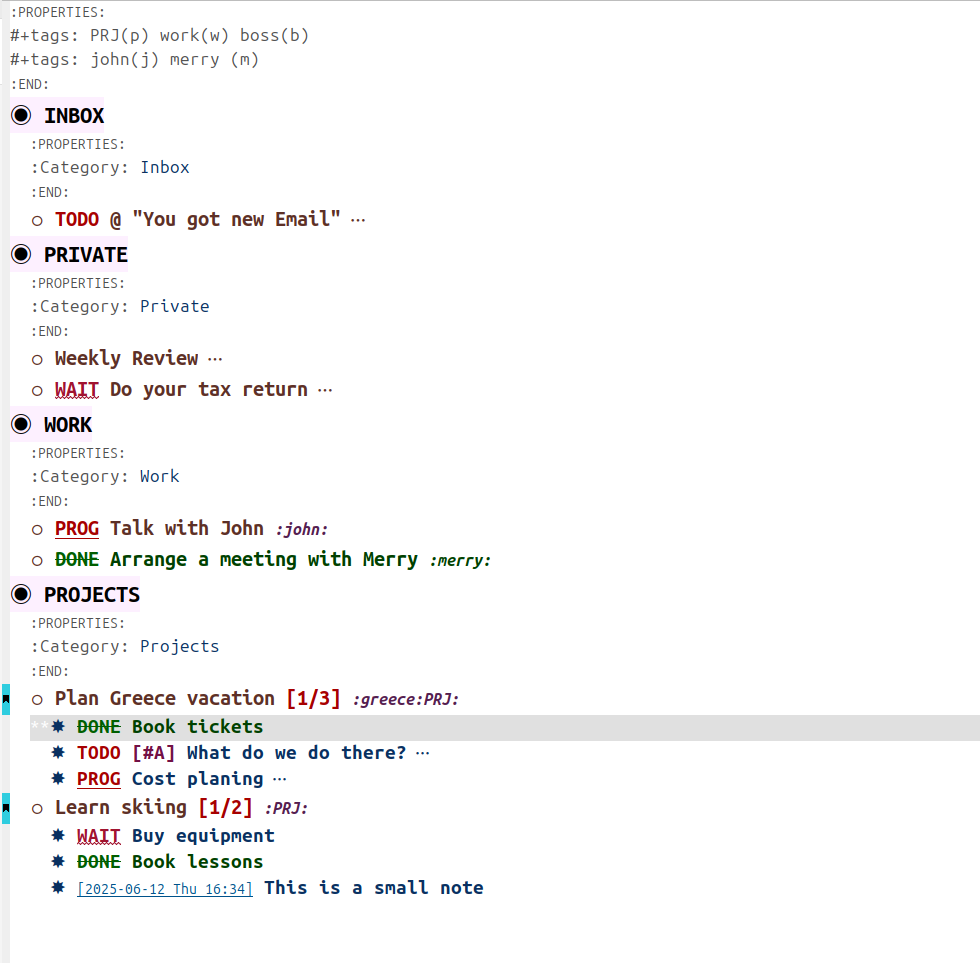
Brainiac is a minimal, distraction-free Emacs configuration designed for GTD workflows, notes, and task management using Org-mode. This v1.1 update focuses on stability and workflow refinements — keeping the setup lightweight while improving daily use.

If you're new to Brainiac, check out the original introduction to learn about the philosophy behind this configuration.

Read more...

#emacs #brainiac #emacscarnival202506

I am glad to announce that my custom Emacs configuration Brainiac has reached release status. I am now using it without major changes since a couple of weeks, so it's time to freeze this version if other people want to use it.

Read more...

#emacscarnival202506 #brainiac

Somewhere during the COVID pandemic I started checking out #emacs, because of a talk I saw on #orgmode that tickled my curiosity.

Read more...

#leadership #emacs

As a manager one of my tasks is to do yearly performance evaluations of the employees in my team.
I take this very seriously, as although I speak regularly with my people about tasks and behaviors, this yearly review gives me time to pause and reflect deeper about the stuff I (and the company) find important and how does the employee measure against that.
During the year I keep notes of all 1:1 meetings we have and also of stuff that happens between them that catch my eye, positive as well as possible improvement points. During the yearly review preparations, I sit down and go thru all the notes in order to consolidate the feedback I want to give to the employee.

Read more...